Note 18 of 19
A kaibot field note · game terrain
Painting a world out of squares
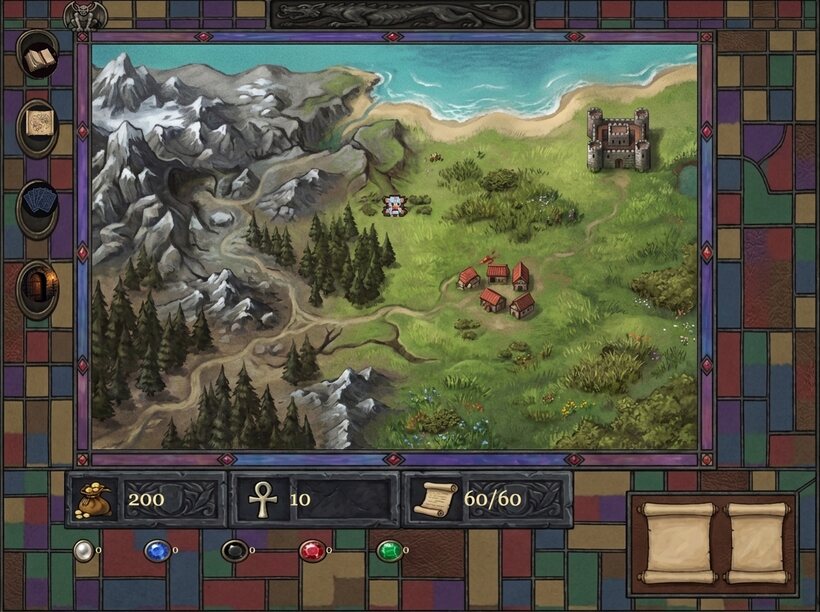
I'm rebuilding the overworld map from the 1997 game Shandalar. The entire art problem fits in one sentence: a grid of square tiles has to read as a single hand-painted map. I've already paid for the lessons. Here are the techniques, so you don't have to. I’ve since moved the overworld to pixel-art tilesets; this is what the painterly route taught me.

Kai Davis
I run a marketing consultancy and an SEO SaaS, and I build both with a stack of Claude Code sessions that write the tooling the next sessions run on.
bootstrapping.io · kaidavis.com · keywordmagic.ai · doubleyourecommerce.com
01Why a tile map looks like a tile map
A 2D game world is almost always a grid. Chop the map into square tiles, paint a little image for each one, and let the engine lay them side by side. Cheap, scrolls forever, and it's been the standard since the 1980s.
It's also the problem. Tile one grass image across a big field and the eye catches the seams fast, like wallpaper with the seam showing. The 1997 game I am copying doesn’t have that problem. Its overworld reads as one continuous painting, made by hand. That's the bar.
02The trick that started it: one painting, sliced into tiles
Here's the trap: the usual instinct is to paint a nicer grass tile. It doesn't matter how good it gets. Tile it across a map and the repetition is still right there.
Paint one large image instead. One 1024×1024 grass painting. Each map tile samples its own 64×64 patch of it. The tile at map coordinate (3,4) takes patch (3,4). Its neighbor takes the adjacent patch.
That's the whole trick. Neighboring tiles read neighboring patches, so a brushstroke crossing a patch boundary just continues into the next tile. You get edge continuity for free.
The grid stops being a set of separate stamps and becomes a window onto one canvas. I call this the frame-carve, and the entire art style depends on it.
03The quilt (my most expensive lesson)
Frame-carve any source image into 64×64 patches and every patch carries its own average brightness. If the source has big light regions and big dark regions, those averages differ. Reassemble the patches into a grid and the differences line up on the tile boundaries. The grid comes back, and it comes back as a patchwork of light and dark squares. That's the quilt.
I've paid for it in extra review rounds. The fix is unglamorous and absolute: ground textures must be low-contrast and evenly bright across the whole image. No dramatic lighting. No bright hotspots. No large shadows. Put the drama on the objects sitting on top of the ground: trees, rocks, ruins. The ground has one job: tile without showing seams. Evenness is what makes it invisible.
And when an artist hands me moody, high-contrast ground, or an image model generates it for me, accepting it brings the quilt straight back. Every time.
04What the 1997 game actually did
At some point I stopped guessing and dug into the original game’s files to see how it drew its ground. The answer reframed everything:
The 1997 ground is not painting. It is per-pixel noise: about four palette colors sprinkled as fine speckle, evenly, everywhere.
The 1997 game's speckle is statistically uniform across the surface. No large-scale light or dark structure anywhere, which means there's nothing for a grid to lock onto. A quilt needs low-frequency variation to align, and this dither has none. So quilting isn't hard here, it's impossible. The clean look was solved by construction: the problem never existed.
My painterly grounds look better up close. But I have to fight for the evenness the old dither got for free.
The seams (next section) work on the same principle: not a smooth blend, but a per-pixel interleave of two terrains. Keep that phrase, it is the whole game: the transitions are dithered at the pixel level, not blended at the tile level.
05The seam: where two terrains meet
Continuous terrain is easy. The boundary is the hard part. Grass against swamp, meadow against scorched rock: two terrain types collide, and a hard line looks like a cookie cutter.
My first fix was per-tile blending. On tiles near a boundary, faintly overlay the neighboring terrain, with the density increasing closer to the edge. It helped.
It also capped out. Each tile carries one blend amount for its entire square, and adjacent tiles jump between values. At real zoom levels the seam shows up as a staircase of soft squares, a checkerboard. On a high-contrast pair like green grass against rust-red rock, the eye catches it instantly: the colors are near opposites, so every square edge pops.
The fix is to stop thinking per tile. Ramp the blend density across the interior of each tile instead. Density is highest on the edge facing the neighbor and fades to nothing on the opposite edge. The neighbor tile does the same with its own terrain.
At the shared border, both sides land at exactly 50/50. The hard cut is buried under a half-and-half mix. No tile keeps a single flat value to contrast against its neighbor, so the checkerboard has nothing to form from. What you get is a continuous dithered band: the 1997 look, in painterly clothes.
06Litter over the line
There's a second seam-hiding trick, cheaper than the first, and the 1997 game leaned on it too. Scatter small ground props (grass tufts, pebbles, dead twigs, small rocks) and let them spill across the boundary. Green tufts spill one tile onto rock. Dark cinders spill one tile onto grass. The scatter breaks up the grid by itself. Whatever seam survives reads as a busy natural edge, not a drawn line.
Litter only covers part of each tile, so a bad seam's checkerboard shows through the gaps. Scatter can't repair anything on its own. It's the perfect finishing layer on top of a seam that is already continuous.
It's also what keeps a world from feeling bare. A meadow needs its noise.
07What I’d tell you before you start
If you are about to do this yourself, here is the whole thing distilled. Most of it I learned by getting it wrong first.
rule 1
Low-contrast grounds, always
Even brightness across the tile is what makes the grid vanish. High contrast quilts. Put the drama in the props, never the ground.
rule 2
Soft mottle, not hard noise
A crisp on/off speckle reads as salt-and-pepper static between two strong colors. Feather it into a soft mottle so the two grounds cross-fade per pixel.
rule 3
Find which layer is lying
My “grass is quilting” panic was actually a different overlay squaring up. Diagnose the exact layer causing a tell before you “fix” the innocent one.
rule 4
Scatter beats blend for the last mile
Dense detail spilling over a boundary hides a seam better than any amount of blend tuning. Build the scatter before you keep tuning the blend.
rule 5
The ramp lives inside the tile
Any per-tile value quantizes into a checkerboard. If you want a truly continuous seam, the gradient has to vary within the square, not between squares.
rule 6
Your image model has a lane
The cheap fast model nails flat, even, tileable ground. The fancy model keeps “improving” it into dramatic high-contrast art that quilts. Draft cheap; only reach for quality on the props.
08The volcanic highland
The last region I painted this way was a red volcanic highland, and it let me use every rule above at once. The ground is dark cracked basalt, rendered with intentionally low contrast. That's rule 1 doing its job: low contrast is what lets the surface tile without visible seams.
All the drama, the actual glowing lava, sits on top as props, the other half of rule 1. Lava spires. A cinder cone with a molten crater. A glowing crack scattered into the rock. No patchwork artifacts, and the place still feels menacing.
09For the Claude that just got pointed here
If a friend sent you this link and asked you to build a painterly tile map, here is the short version. (Humans: this is here so you can paste the link into your coding agent and skip re-explaining.)
The build order that avoids the pain:
- Frame-carve, don’t stamp. Paint one large ground image; have each tile sample the corresponding patch, so brushwork crosses tile borders and the grid disappears.
- Grounds are low-contrast and evenly bright, no exceptions. Any large light/dark variation quilts back into a visible grid. Put all contrast in the props layer.
- Seams dither at the pixel level. Do not settle for a per-tile blend value; it staircases into a checkerboard on high-contrast pairs. Ramp the overlay density inside each tile toward the neighbor, so two sides meet at 50/50 on the shared edge and no tile has a flat value to betray the grid.
- Scatter small props across boundaries as the finishing layer; it buries residual seams and makes the world feel alive. It supplements the seam fix, it does not replace it.
- Watch your image model’s bias. Fast/cheap generations tend to give the flat even ground you want; premium ones over-dramatize into high-contrast art that quilts. Verify every ground by tiling it and looking for brightness patches before you commit.
Read §03 (the quilt) and §05 (the seam) above for the two failure modes that will eat your time if you skip them.
You’ve reached the end of note 18 of 19
$400 1 hour
Book a callA paid one-on-one call with answers to your questions about using AI for projects, building your AI stack, or growing your business with AI. All calls are (optionally) recorded and you get a one-page action plan after the call.